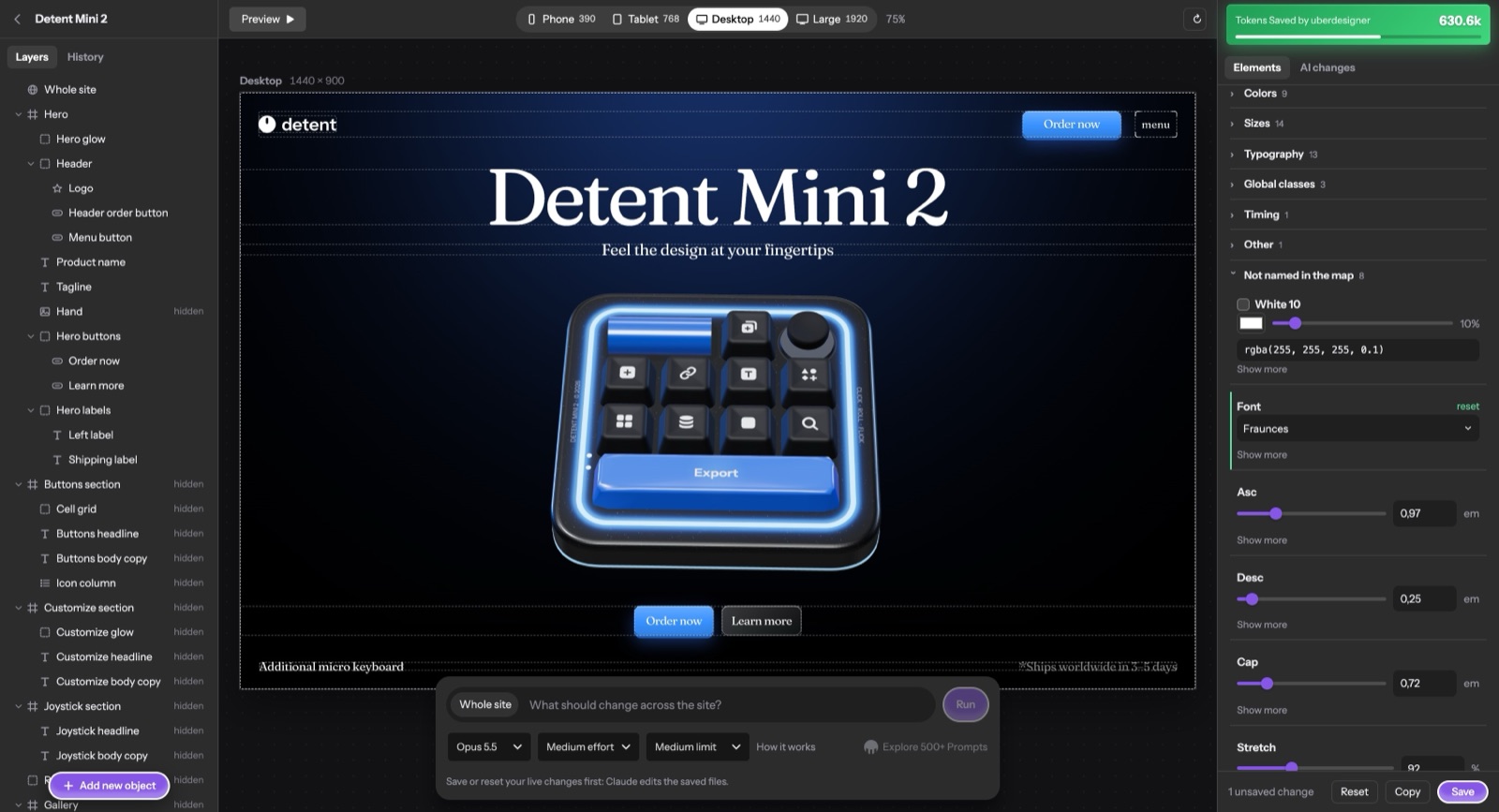
uberdesigner studio is a Claude design skill: a skill for Claude Code that turns a built website into one you can edit by clicking. It maps the site into named parts and opens an editor in your browser, where you pick a part, change its values live, or ask Claude to change that part and nothing else. It is free and open source, and the install steps are on its page.
We made it because building a site with AI has become the quick part. The slow part is everything after: the headline a size too big, the section that needs more air, the button with the wrong words.
The problem with small changes
A small change is one line of code. Asked for in the session that built the site, it travels with the whole conversation, and Claude often reads files again to be sure where the line is. You pay for the context, not for the change.
It also puts the design at risk. "Make the hero headline smaller" leaves Claude to decide which headline, in which file, and how far the change should reach. That is how a fix to one section ends up restyling another.
What the studio does
It runs once per project and does four things:
- Indexes the code with a script: the files, the design tokens, the meaningful elements of each component.
- Reads the build prompt, if there is one, section by section.
- Has Claude write a map: each part of the page, the prompt lines that describe it, the tokens that style it and the files it lives in.
- Tags the parts in your code, installs the editor and checks the map against the project.
Only the third step needs Claude's judgment. The scripts spend no tokens.
The editor
Press I on your site and the editor opens on localhost, laid out the way a design tool is:
- Left, layers. The page's parts, nested like a design file: each section holds what's in it. Click a layer and the site scrolls to it. Click something on the site and its layer opens.
- Middle, the site. Shown at phone, tablet, desktop or large-monitor size, at that real width, so media queries and scripts behave as they would on that screen.
- Right, the picked part. The lines of the build prompt that define it, its words, and its design tokens next to the site's global ones.
From there you can do three things. Tweak a value and watch the open page follow. Type over text: double-click the words and retype them where they sit; when those words appear once in the source, the file is changed directly, with no call to Claude. Ask for a change in the chat bar under the site, for the picked part only.
Every change is kept in a history you can restore from.
What a change costs
When you ask for a change through the editor, the studio sends Claude that part's prompt lines and the pieces of the files it lives in, not the project.
We measured it on 15 November 2026 with Opus 5.5: ten everyday design changes on two of our own sites, each made once through the editor and once by asking Claude Code directly in a fresh copy of the site. The median was 12.1k tokens through the editor and 62k with plain Claude Code, about a fifth. Change by change the saving ranged from 3 times to 8.7 times. On the strictest count, with cached reads treated as free, the median saving was 2.8 times.
Those are our own numbers from our own sites, and results vary by project. The method and the scripts that produced them come with the studio, so you can run the comparison on yours.
What it works on
- Vite + React + TypeScript projects, which is what every uberdesigner template is.
- Sites with no build step: one HTML page with its CSS and JavaScript inside, or plain HTML, CSS and JS files. This is what Claude Code makes when asked for "a website" with no stack named.
- A plain site with its own small Node server, such as one that saves a form.
- A page made as a claude.ai Artifact, once it is copied into a folder.
It needs Claude Code and Node.js; setup checks both first. Everything the editor adds lives in one folder that git ignores. Your site keeps only small markers on its elements and a map file, and production builds never include the editor.
When to set it up
Right after Claude builds the site, in the same conversation. The prompt and the code are still in context then, so nothing has to be read again; with the studio installed, Claude Code offers the editor in its hand-over. Setting it up on a site built earlier works too and costs more, because the code has to be read from scratch.
Starting from a finished design helps the map as much as it helps the build: a template's prompt describes the page part by part, and those descriptions are what the editor shows beside each part. The library is where ours are.
FAQ
Is uberdesigner studio a separate app?
No. It is a skill for Claude Code: a folder of instructions and scripts Claude Code loads when you ask it to set up the editor. The editor itself runs on your machine, on localhost.
Does it work with tools other than Claude Code?
Not today. The studio is written for Claude Code, and the changes you ask for in the editor run through Claude Code on your own account.
Does it only work with uberdesigner templates?
No. It works on any site in the shapes listed above. A template's build prompt makes the map richer, because each part can show the lines that describe it.
Will it change how my site builds or deploys?
No. A fresh clone without the editor's folder still builds, and nothing of the editor ships with the site.